Yoslion Download
Chrome’s “Network Error” on a Download: What It Actually Means and What Can Be Recovered
Why Chrome stops a download, what its error message does and does not tell you, when Chrome itself can resume one, and what a download manager can and cannot recover from a half-finished transfer.
Written and published by Palacios Software Group LLC · 23 October 2026 · Last updated 23 October 2026
A download in Chrome has stopped and the entry in your downloads list says it failed. Before anything else: that message is a category, not a diagnosis. It narrows what went wrong without identifying it, and the single most common mistake from here is to treat the words on screen as the cause and start fixing that.
This guide explains what Chrome’s download failures actually tell you, how to use Chrome’s own controls to resume one when that is still possible, why a retry sometimes restarts from zero, and what a download manager can and cannot recover. That last part has a short answer that most articles on this subject leave out, so it is worth stating here: the bytes already sitting in a half-finished Chrome download are not recoverable by another program.
The short version
Three things are worth checking before you try anything more involved, in this order.
- Look for a Resume control on the failed item. Google documents that Chrome resumes some downloads automatically, and that you can resume a paused one yourself from the download tray. If that control is there, it is the whole answer and nothing else on this page applies to you.
- Try the same address once more. A single dropped connection is the most ordinary cause there is, and a second attempt settles it either way. If the retry begins at zero rather than continuing, that tells you something specific about the server, and “Why retrying sometimes starts from zero” below explains what.
- Check whether the file is being blocked rather than broken. A download stopped on security grounds is a different kind of problem with a different answer, and the last section of this guide treats it separately. It is not a network fault and retrying will not change it.
What is not worth doing yet: reinstalling Chrome, clearing your profile, or switching off protection that is working as intended. Those are the first suggestions in most results for this problem and they are a long way ahead of the evidence.
What Chrome's download errors actually tell you
Chrome distinguishes far more failure cases internally than it shows you. Its extensions API documents a download’s interruption reason as one of a fixed list, grouped by prefix: NETWORK_ for connection problems, SERVER_ for what the other end did, FILE_ for writing to disk, and USER_ for what you canceled. There are more than twenty values across those groups.
The interface collapses much of that. Google’s own support page for download errors lists a handful of named conditions — including NETWORK_FAILED, a blocked download, a missing file, a failed virus scan, a full disk, insufficient permissions, and needing authorization — which is a much shorter list than the one the API enumerates. So the text you are looking at is a bucket, and several genuinely different problems share it.
These are the categories worth telling apart, because the right next step differs for each. They are not equivalent, and none of them is reliably identifiable from the message alone:
- The connection ended. Wi-Fi changed, a router restarted, a VPN reconnected, a laptop slept, or the link simply dropped for a moment. This is the ordinary case and the one a retry usually settles.
- The server ended it. Many servers close an idle connection, cap how long one response may take, or limit how many connections one address may hold. None of that is a fault on your side, and none of it is something a client can overrule.
- The link stopped being valid. Download addresses are often signed for a short window, issued for a single use, or tied to a page you arrived from. When one expires, the next request is refused even though the first one worked — and no software can reissue somebody else’s signed address.
- The session or the authorization lapsed. A file behind a sign-in may need the sign-in again. Google’s page names both a forbidden response and needing authorization as distinct conditions, and its advice for them is to check whether you need to sign in, or to ask the site.
- The file at the source changed. If the thing you were part-way through is no longer byte-for-byte what it was, continuing would stitch two different versions together. “Why retrying sometimes starts from zero” below explains how HTTP is supposed to catch that.
- Writing to disk failed. A full volume, a path you cannot write to, a name that is too long, or a file that something else has open. Google lists a full disk and insufficient permissions as their own conditions, and for permissions its advice is to cancel the download and try again, or save somewhere you can write.
- Chrome blocked it on purpose. This is not a failure at all, and it is covered on its own below.
We tested this rather than assuming it. Against HTTP servers running on 127.0.0.1, we broke two downloads by destroying the connection part-way through the response — a real transport failure, not a browser setting. In the run where the server had declared a Content-Length and then sent far less than it promised, Chrome 156 on Windows 11 reported Failed – File incomplete. In the run where no length had been declared at all, the same kind of break was reported as Failed – Network error.
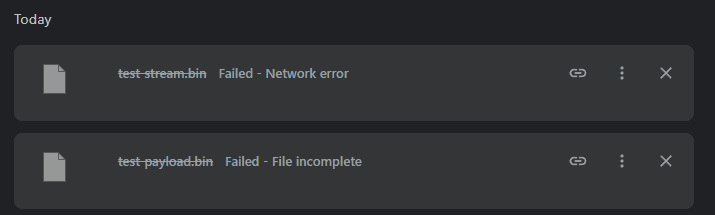
Those are two reproduced scenarios, not a map of everything Chrome can do. We are not claiming that a declared length is by itself what decides which message you see, and we have not tried to enumerate the conditions behind each one — the useful conclusion is narrower and more practical: the same underlying failure can surface under more than one name, so the name is a starting point for investigation rather than a diagnosis.
What the message does not tell you
The words on screen rarely separate “your connection dropped” from “the server hung up” from “the address expired”. Attributing a specific cause to a generic message is guessing, and the usual cost of guessing here is an hour spent reinstalling a browser that was never the problem.
Can Chrome resume the failed download?
Sometimes, and Chrome’s own controls are the first place to look. Google documents that you point at the file’s name in the download tray at the top right and then choose Pause, Resume or Cancel. Its general advice for download errors is that Chrome resumes them automatically, or that you can click Resume on the paused file. If a Resume control is offered on your failed item, use it — it is continuing the transfer Chrome already has, which is exactly what you want.
Whether that control is available is not arbitrary. The extensions API describes a download as resumable when it is in progress and paused, or when it is interrupted and can be resumed from where it stopped — and it distinguishes a paused download, which has stopped reading data but kept the connection open, from an interrupted one, where an error broke the connection to the host. Those are different situations, and only some of them can be picked up.
In our own test the bubble did offer a Resume link on one of the broken transfers, while the full history page for the same download showed no such control and worded the failure differently. So it is worth checking both surfaces before concluding there is nothing to resume.
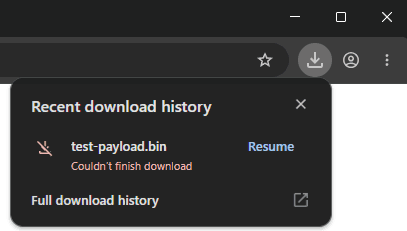
One more thing we saw, and it is the practical reason not to sit and wait: Chrome retried those transfers by itself several times before stopping, and each retry asked for the whole file from the beginning rather than for the part that was missing. We are not claiming a fixed number of retries or a general rule about when Chrome asks for a byte range — HTTP allows a client to request one whether or not the server advertised support, so the absence of such a request is an observation here, not something we can attribute to a single cause.
If Chrome offers no way to resume
Then the transfer is over, and the honest answer is that the partial data is not going to be rescued. There is no setting, no extension and no second program that reads what Chrome left behind and carries on from it. Anything that promises otherwise is describing software that does not exist.
Why retrying sometimes starts from zero
Continuing a transfer instead of restarting it is a specific HTTP operation, not a courtesy. The client asks for only the part it is missing with a Range header; a server that honors that answers 206 Partial Content and says which bytes it sent. A server that does not answers 200 OK with the whole file from the beginning — which is a restart, however it looks in the interface. RFC 9110 specifies all of this.
Two further conditions have to hold. The file has to still be the same file, which HTTP handles with validators and with If-Range, so the server sends the partial range only if its validator still matches and the whole file otherwise. And the address has to still work, which a signed, expiring or single-use link may not.
There is a trap worth knowing. A server advertising Accept-Ranges: bytes is not promising that your download can be resumed. RFC 9110 says the field “only provides advice”, that support may exist only at certain times or under certain conditions, and that a server “MAY ignore the Range header field”. Chrome’s own interruption list includes a reason for a server that will not serve a range at all. You find out by trying, not by inspecting.
So when a retry starts at zero, that is usually not a bug in anything on your computer. It is the source declining to continue, and it is the same answer any client would get.
What a download manager can and cannot recover
This is where most advice on this subject becomes misleading, so it is worth being precise. There are three different situations, they have three different answers, and they are routinely discussed as if they were one.
- A partial download Chrome created. Chrome writes in-progress downloads to a
.crdownloadfile. Yoslion Download does not read, adopt, import or continue that file, and the bytes already in it are not recovered by starting the download again in Yoslion. No feature does this. If Chrome cannot resume it, those bytes are spent. - A new transfer you start in Yoslion Download. This begins at the beginning, as its own transfer, under Yoslion’s own record of progress. It is not a continuation of the Chrome attempt and does not inherit anything from it. What you gain applies from that point forward, not backward.
- A partial transfer Yoslion created earlier. This is the case its persistence is for. Progress is written to disk as the transfer runs, so after a network failure, a crash or a restart it resumes from its last durable checkpoint rather than from an assumption about what had been requested — when the source still supports a range request and the address still works. Some transfers are split across several connections and some run as a single stream; both keep the same durable record.
Stated plainly
Yoslion Download can resume its own interrupted transfers. It cannot rescue Chrome’s. Those are different claims, and the first one is not evidence for the second.
Nor does any of it change the protocol. Durable progress solves the half of the problem that belongs to your computer; it cannot make a server serve a range it refuses to serve, revive an expired link, restore a lapsed session, or stop a connection from dropping again.
When to use Yoslion Download
Yoslion Download is a desktop download manager, and it is made by the company publishing this article — worth saying plainly before any description of what it does. Windows, macOS and Linux are all supported platforms for the application itself.
It earns its place on the download you are about to start, not the one that just failed. If a transfer is long enough that an interruption is likely rather than unlucky — a large installer, a dataset, a slow or shared connection, a laptop that sleeps — then starting it in something that keeps a durable record of progress is worth more than starting it in a browser tab you have to leave open. What it adds is not a speed you can be promised in advance.
There is a browser extension as well, and its job is narrow: it hands a download over from the browser as you start it. Install it, then start a download as you normally would. Yoslion Download has to be running on the same computer for the extension to have anywhere to hand it.
Where our evidence stops
The Chrome extension is published on the Chrome Web Store as one listing shared by Chrome, Edge, Brave, Chromium and Opera. A physical check of the extension inside Chrome itself is still owed: Chrome no longer loads an unpacked build, so it was exercised in Edge on the same Chromium engine and with the same Store identity. That is a statement about our evidence, not a verdict about the browser.
And none of this is a way around the obstacles listed earlier under “What Chrome’s download errors actually tell you”. A download manager is not a method for overruling a server, an expired address, a sign-in, or a security decision. Software that claimed otherwise would be describing an internet that does not exist.
When the download was blocked, not broken
A download Chrome stopped on security grounds is a different category of event, and treating it as a network problem wastes your time. Google documents that Chrome blocks downloads it considers dangerous, that you may see a warning such as a blocked dangerous download or a notice that a file may be dangerous, and that when a download is blocked you are protected and do not need to take further action.
Retrying will not change that outcome, because nothing failed. The useful questions are whether you are getting the file from the place its publisher actually distributes it, and whether you have any independent reason to trust it.
One thing this guide will not suggest
Turning off Safe Browsing, an antivirus, TLS verification or an operating system download control to get a file through. Those are the leading suggestions in most results for this problem, and Google warns on its own page that attackers may ask you to turn off or ignore warnings. Removing the check does not make the file safe; it only stops you being told.
Check what you ended up with
Whichever route the file arrived by, a download reaching its end is a statement about the transfer, not a check of the bytes against what the publisher intended. That is a separate step. The ordinary way to do it is a checksum: when a distributor publishes a SHA-256 through a channel you trust, comparing it with the file on disk is a strong way to confirm the bytes you received match that published reference.
What the comparison does not do by itself is authenticate the publisher — it tells you the file matches the reference, and the reference is worth exactly as much as the channel it came through. A digest printed beside the file it describes is weaker than one you can reach independently.
What this article relies on
Each statement below is the exact limit of what Yoslion has measured. Anything wider than these sentences is not something this article claims.
- The Chrome extension is published on the Chrome Web Store as one listing shared by Chrome, Edge, Brave, Chromium and Opera.
- A physical check of the extension inside Chrome itself is still owed: Chrome no longer loads an unpacked build, so it was exercised in Edge on the same Chromium engine and with the same Store identity.
- Windows, macOS and Linux are all supported platforms for the application itself.
Sources
The sources below document third-party software and technical standards. Findings from our own controlled tests are identified separately in the article.
- Google — Fix file download errors in Google Chrome
- The page names a short list of download conditions, including NETWORK_FAILED, a blocked download, a missing file, a failed virus scan, a full disk, insufficient permissions, needing authorization and a forbidden response. Its general advice is to check that the internet connection is working, that Chrome resumes downloads automatically or the paused file can be resumed, and to contact the website owner. It does not document the exact words 'Network error'.
- Read 22 October 2026
- Google — Download a file using Google Chrome
- Pointing at a file's name in the download tray at the top right offers Pause, Resume and Cancel, and downloads go to a default download location that can be changed in Settings.
- Read 22 October 2026
- Google — chrome.downloads API reference for Chrome extensions
- A download's interruption reason is one of a fixed enumeration grouped by prefix: NETWORK_ (including NETWORK_FAILED, NETWORK_TIMEOUT, NETWORK_DISCONNECTED, NETWORK_SERVER_DOWN and NETWORK_INVALID_REQUEST), SERVER_ (including SERVER_NO_RANGE, SERVER_UNAUTHORIZED and SERVER_FORBIDDEN), FILE_ and USER_, more than twenty values in total. A download is resumable when it is in progress and paused, or interrupted and able to resume from where it stopped; a paused download has stopped reading data but kept the connection open, while an interrupted one had its connection broken.
- Read 22 October 2026
- IETF — RFC 9110: HTTP Semantics
- Range requests, Content-Range and If-Range are specified in RFC 9110 sections 13.1.5 and 14; 206 Partial Content is specified in section 15.3.7. Accept-Ranges is advisory only: it 'only provides advice', a server 'MAY ignore the Range header field', and support may exist only at certain times or under certain conditions.
- Read 22 October 2026
- Google — Download files and apps safely in Google Chrome
- Chrome blocks downloads it considers dangerous, may warn that a dangerous download was blocked or that a file may be dangerous, and states that when a download is blocked you are protected and do not need to take further action. The page warns that attackers may ask you to turn off or ignore warnings, and advises taking download warnings seriously.
- Read 22 October 2026